


With Windows Protected Print, Microsoft takes over printing in the operating system itself – which means vendor printer drivers are no longer permitted. A further development of docuFORM's patented print solution offers extended print options within Microsoft Protected Print Mode.
What is the docuFORM GPC client?
docuFORM's Global Printer Client (GPC client) prints without vendor printer drivers. It uses docuFORM's method, patented throughout Europe and based on PostScript data stream technology – for Windows (x86 and ARM) and macOS.
- Replaces vendor-specific printer drivers – one client for all PostScript and PCL6-capable devices, across vendors
- Full device functionality, e.g. stapling, hole punching and secure print
- No driver roll-out and no driver maintenance – new printers are available automatically
- Cross-vendor Follow'2'Print: release your print job at the device of your choice
Current situation and state of the art in Windows printing
Every printer vendor currently offers its own Windows printer drivers for its own output devices. These are optimally matched to the functions of the respective printer hardware.
At the same time, the Windows operating system environment allows any number of printer queues to be created, with which users can combine printer drivers flexibly and use them individually.
The new standardMicrosoft Protected Print Mode as the new operating system standard
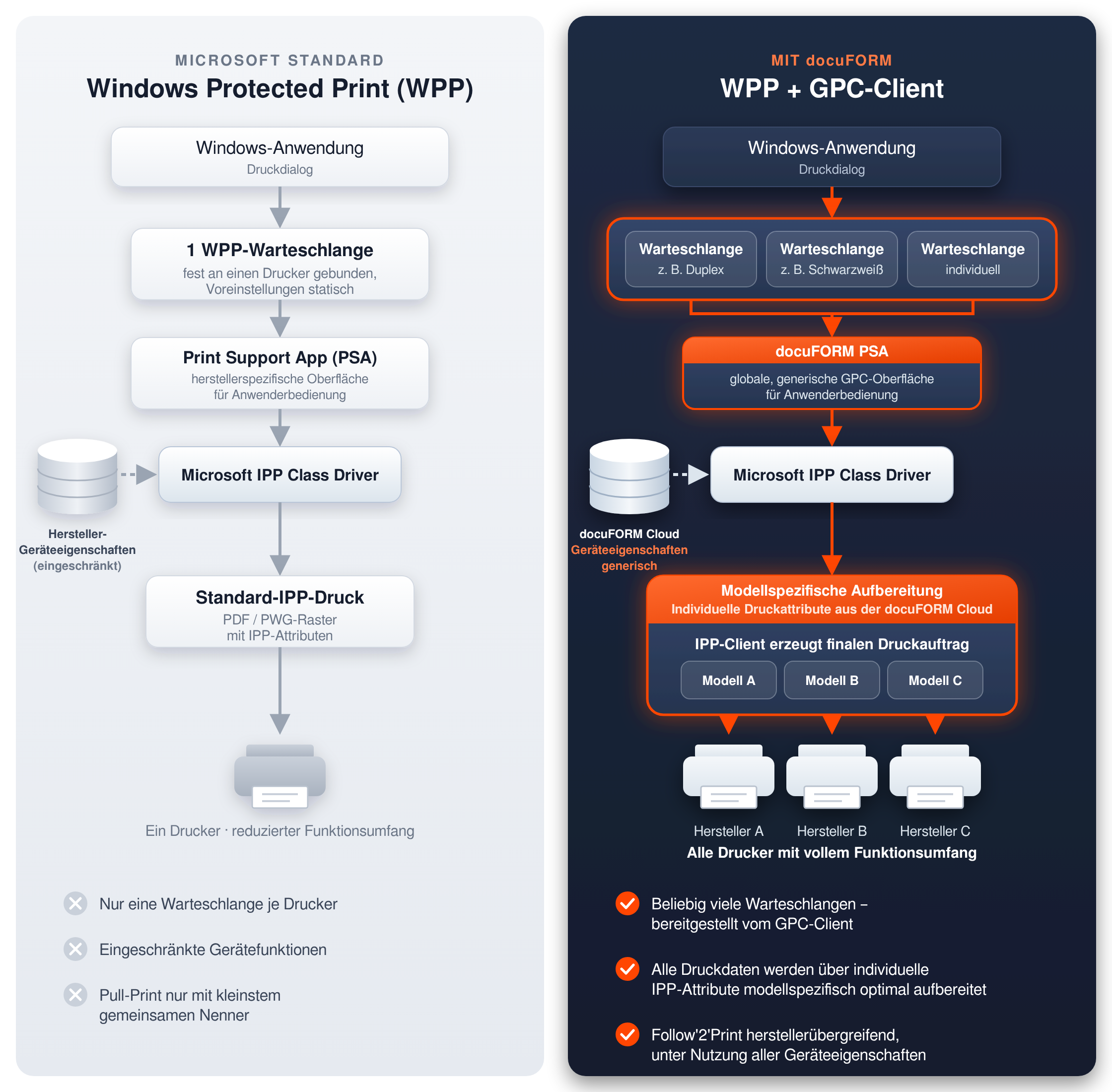
With this new technology, Microsoft itself takes over printing within its operating system. Vendor printer drivers are no longer permitted. There is also only one printer queue per printer, as queues and printers can now only be linked directly to each other.
This results in two serious disadvantages:
- The rigid link between a single printer queue and the printer severely restricts the options previously available to users.
- With pull-print workflows, in which users release their print job at the device themselves, functionality is further restricted, because the print job has already been fully rendered in a queue without knowing which output device will be used later.
docuFORM's patented print solution
The docuFORM print solution likewise already does without classic vendor printer drivers and, similar to Protected Mode, uses generic print documents together with specific job attributes.
In addition, the docuFORM Cloud contains an XML-based database with all print control commands for all printing systems from all vendors.
With the docuFORM print solution, a Global Printer Client (GPC) is installed on every workstation. For both direct printing and Follow'2'Print printing, the matching XML control file obtained from the cloud is only combined with the generic print job once the printing system has been determined. This always produces an optimally matched print job for every output device at any time – across vendors and ideal not only for direct printing but also for all Follow'2'Print applications.
Extended print options in Protected Print Mode with docuFORM (GPC)
- Integrating the docuFORM GPC print solution into Protected Print Mode makes it possible to manage multiple printer queues again. Users can address them independently and in parallel as usual, customising each individual queue.
Both Microsoft Protected Print Mode and the docuFORM GPC print solution initially work with generic print jobs and associated job tickets. These are now referred to as print attributes.
- Unlike in Protected Print Mode, however, the print job in the GPC remains generic until the output device has been finally determined. Only then are the generic print attributes replaced by vendor-specific ones, in line with the patented workflow.
- The actual print rendering takes place in the printer itself as part of a standardised IPP printing process.
- Print jobs can also be passed on to independent, external servers for further, alternative workflows. The original idea and associated technology of Microsoft Protected Print Mode are retained.
The GPC client for Windows pays off from day one
- One client for all printers – no driver roll-out, no driver maintenance, no driver chaos.
- Full functionality of all devices, e.g. stapling, hole punching and secure print – across vendors.
- New hardware or a change of vendor? Your users carry on working as usual.
- Follow'2'Print: release confidential documents securely at the device of your choice.
The icing on the cake: Integration into Microsoft Protected Print Mode will follow during 2027 – as a free update, without retraining users. This means you are already well prepared today.
Talk to us
Would you like to know what the GPC client means for your print environment? We are happy to advise you: +49 721 161 980 or info@docuform.de.
White paper: White paper WPP & GPC
Windows is a trademark of the Microsoft group of companies.